
Panic mode
KK Library's panic key hides every window with one press of Esc and blurs the pictures of Koikatsu assets rated R-18 again.
- Where to find it
- Panic key and Reveal NSFW in the status bar, and the KK Library icon in the notification area
What it is
#The panic key hides every KK Library window and blurs pictures rated R-18. KK Library keeps running while hidden. Use its Windows notification area icon to bring the windows back.
What it can do
#Hide every window
#Esc hides every KK Library window, even while you type in a box or a right-click menu is open.
- The windows leave the taskbar and Alt+Tab too.
- A KK Library notification still on screen goes away, and so does its copy in the Windows notification center.
- While hidden, KK Library opens no window by itself. A message waits until you come back.
- Hide KK Library in the title bar or the icon's menu hides the same way but leaves Reveal NSFW as it is.
- The main window's ✕ closes KK Library. It doesn't hide it.
Keep NSFW pictures blurred
#While Reveal NSFW is off, pictures of assets rated R-18 are blurred in the grid, the inspector and the Quick List.
- Only the rating blurs a picture, never a tag (Rate an asset).
- The switch is one setting for every mode, and it stays as you left it after a restart.
Bring KK Library back
#Every window comes back where it was, with your work in it.
- Use the notification area icon, or open KK Library again.
- The icon's menu also opens the Quick List, Author Manager or Tag Manager.
How to do it
#Hide KK Library at once
#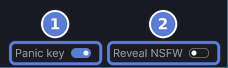
- Press Esc in any KK Library window. Every window disappears. Reveal NSFW (2) turns off.
- To come back, double-click the KK Library icon in the notification area (Use the notification area icon). Opening KK Library again works too.
- To use Esc to close a list or cancel, turn Panic key (1) off.
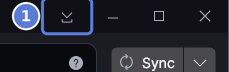
- To hide KK Library and keep Reveal NSFW as it is, select Hide KK Library (1) in the title bar.
See NSFW pictures
#- Rate an asset R-18 in the inspector (Rate an asset). Its tile is blurred and shows R-18.
- Turn on Reveal NSFW at the right of the status bar. The pictures show in every mode.
- To blur them again, turn Reveal NSFW off, or press Esc while Panic key is on.
Use the notification area icon
#- Find the KK Library icon in the notification area, at the right end of the taskbar. If you don't see it, look under the arrow at the left of the notification area. While KK Library is hidden, the icon shows a crossed-out eye.
- Double-click the icon to bring KK Library back.
- Select the icon once to open its menu. It lists Show KK Library, or Hide KK Library while KK Library is on screen. Then Quick List, Author Manager, Tag Manager and Exit.
- Choose Quick List, Author Manager or Tag Manager to open that window. KK Library comes back first if it was hidden.
- Choose Exit to close KK Library.
Checked with KK Library 0.1.0-beta.9.1