KK Library Scene & Card Manager

Koikatsu & Koikatsu Sunshine

Scene & Card Library Manager

Made by someone who got fed up with the whole scenes and cards folder mess.

Local app. Portable ZIP. No account.

Current release

Beta

Windows SmartScreen may warn on first launch.

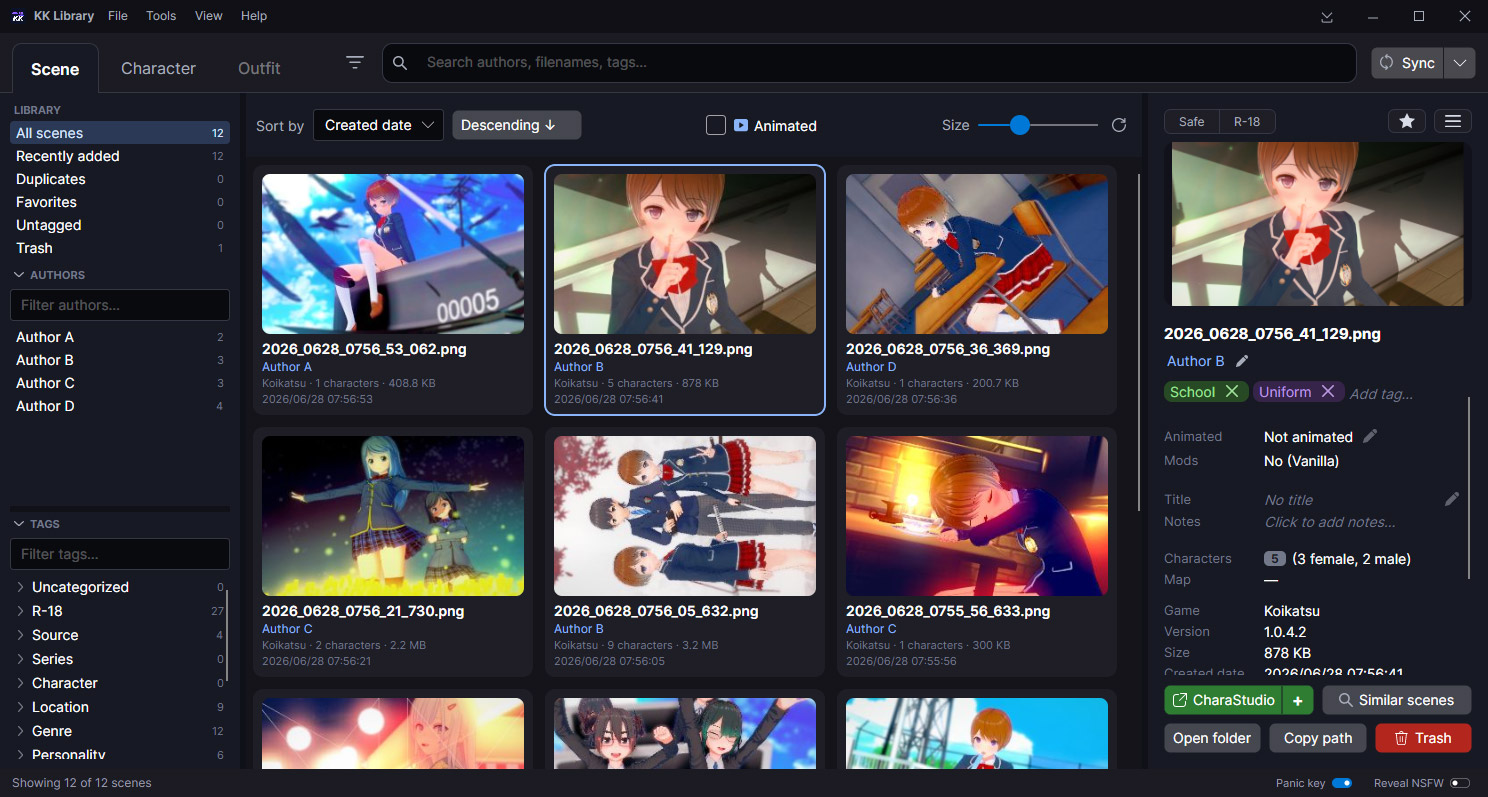
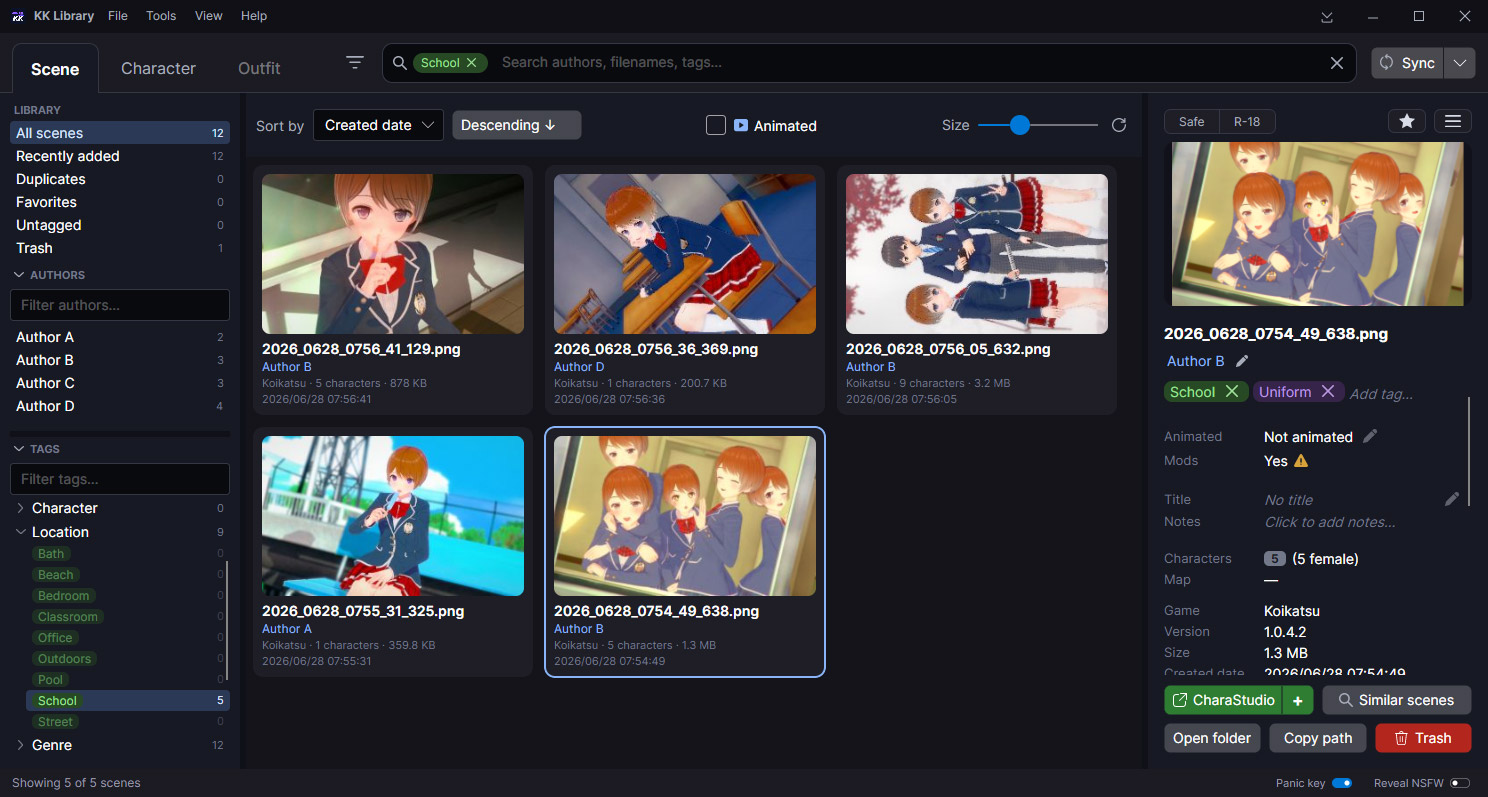
Main application screenshot Main window: scene grid, search, tags, authors and inspector
What is it

One place for your Koikatsu scenes, cards and outfits.

If you have used KK or KKS for a while, your collection is probably a mess: nested folders, vague names, duplicate downloads, repeated saves and a lot of files you don't even remember anymore.

KK Library scan those folders, show what is inside, find duplicate or related files, clean up tags and author names and organize everything without opening each file in-game.

Price Free. Forever
Supports Koikatsu and Koikatsu Sunshine (but not required)
OS Windows 10 (x64) and Windows 11 (x64)
Size ~133 MB (~54Mb zipped)
Free space At least 150 MB for the app itself
Installation Not required. Portable ZIP
Network Not required (unless you want to)
Languages English and Japanese

Support keeps
the project going!

If you liked the app, your support is appreciated.

Find assets across your folders

Scan folders into one searchable library.

Switch between Scene, Character and Outfit views, then search, filter and inspect everything from one place.

  • Multiple or mixed folders
  • Search + filters
  • Previews + useful details
  • Character names and scene metadata
Browse / search screenshot Main library view in Scene mode

Find duplicates and similar files

Easy and safe cleanup

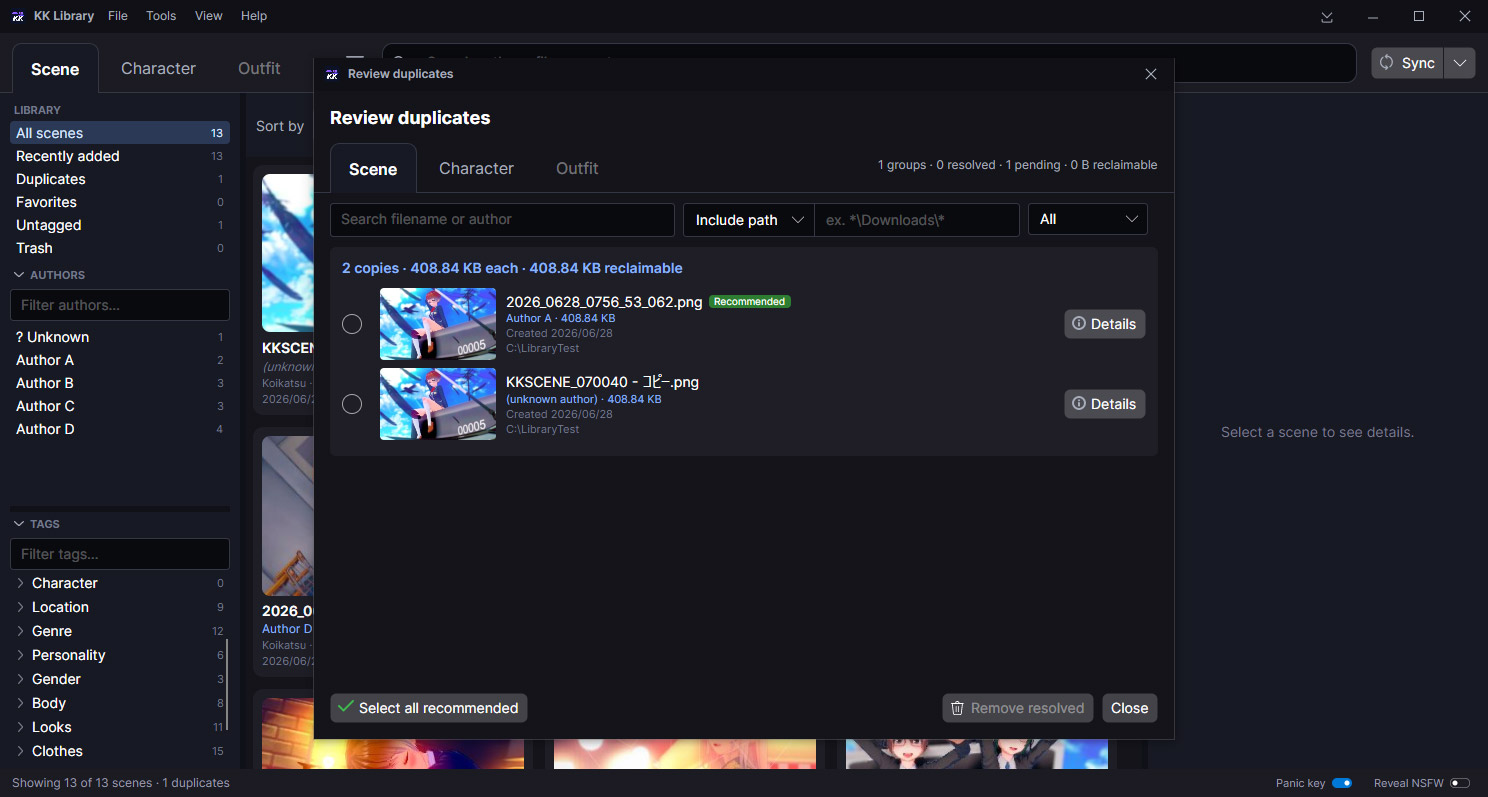
This is likely what you have been looking for. Find and get rid of all those duplicated scenes or variants without losing what is important to you.

  • Exact duplicate scenes, cards and outfits
  • Find similar scenes, cards and outfits variants
  • Remove, rename or move files in batch
Duplicate review screenshot Exact duplicate review in Scene mode

Tags, ratings, favorites and all that

Keep your own library work in order.

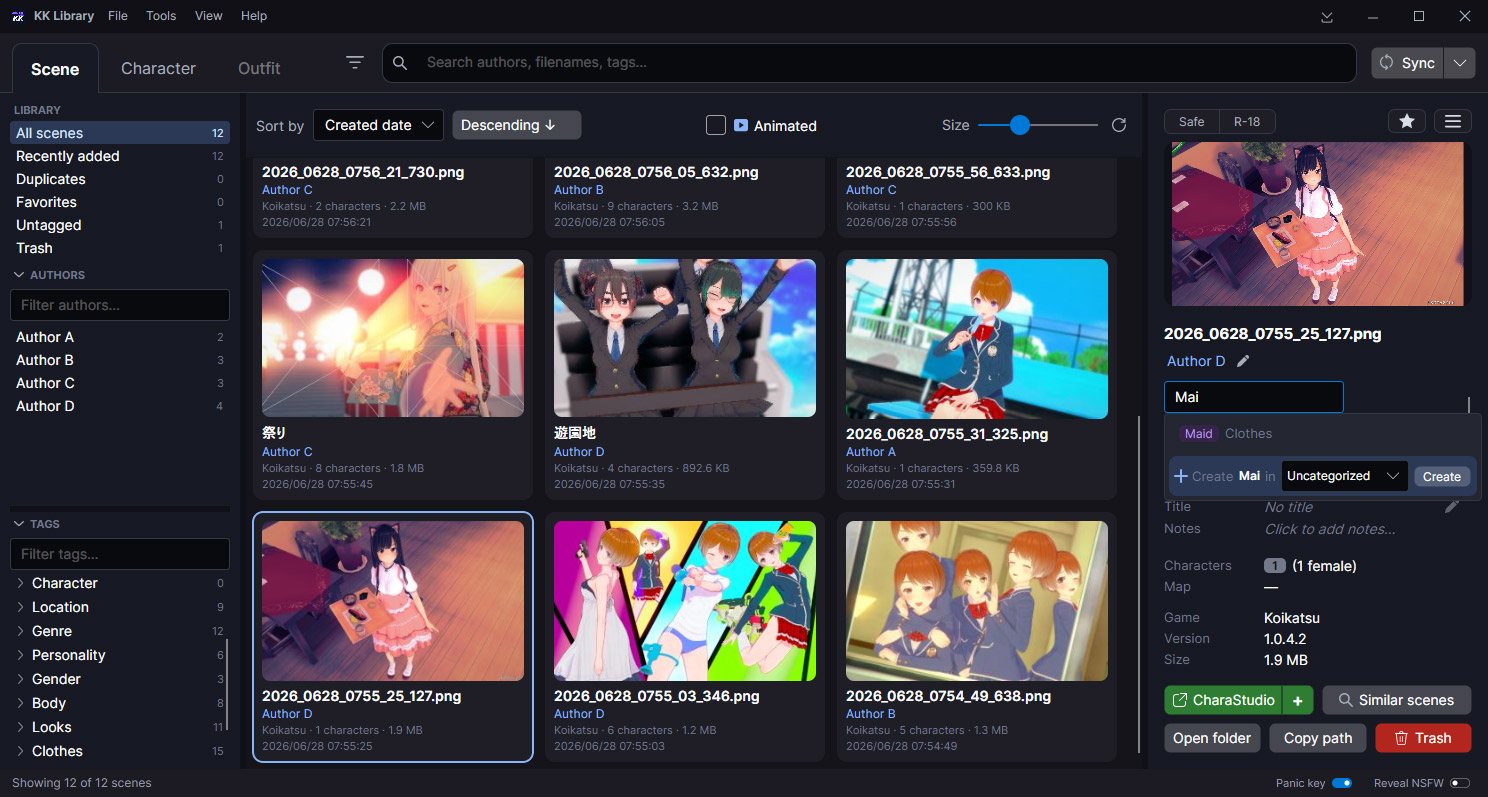
Add tags, fix author names and keep your ratings and favorites attached to each file. Tags and authors each get their own management screen when you want to sort out the whole set.

  • Check installed and missing mods
  • Organize tags and categories
  • Manage and identify authors
  • Ratings and favorites
Tags / author management screenshot Tags, ratings, favorites and author

Edit character cards without the game

Explore every detail and make the card your own.

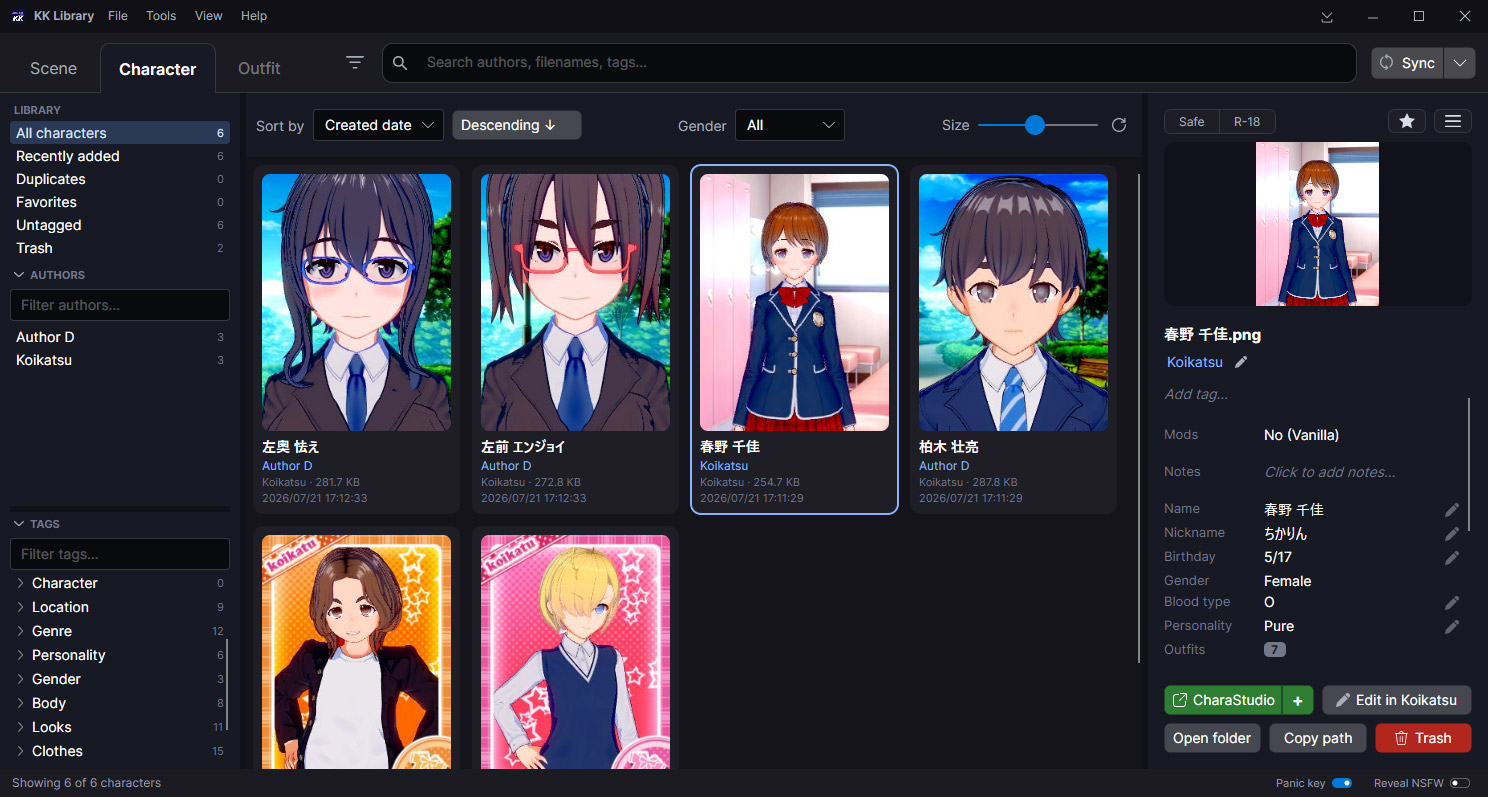
Open a clear view of the card's profile and appearance. Edit what you want without launching Chara Maker.

  • Edit names and profile details
  • Browse every outfit, part and property
  • Preview, export or replace embedded images
  • Add or remove supported customizations
Character card management screenshot Character mode management

More tools

What else it does

Organize files

Build a cleaner folder layout for assets. Preview the full plan before moving files or copying a backup.

Work with the game

Open scenes in CharaStudio. Add or replace characters or edit them in Chara Maker.

NSFW handling

Mark scenes or cards Safe or R-18 and blur previews. Hide everything to the tray with Esc key.

Your work survives

Tags, ratings and authors stay attached through moves, renames, re-packs and outside edits.

Edit in bulk

Select scenes, cards or outfits and tag, rate or fix the author on all of them at once.

Made for big folders

Built for oversized, messy collections. Browse and search in large scenes, cards and coordinates.

Edit card details

Update supported profile details without opening Chara Maker.

Edit card textures

Preview, export or replace textures. Edit supported materials and overlays.

Quick List

Keep scenes, cards or outfits ready to drag into CharaStudio or Chara Maker while you browse.

F.A.Q

Questions people usually ask

Windows warns about an "unknown publisher", is it safe?

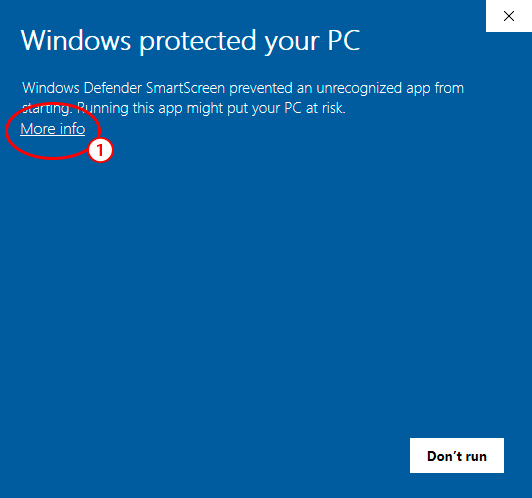
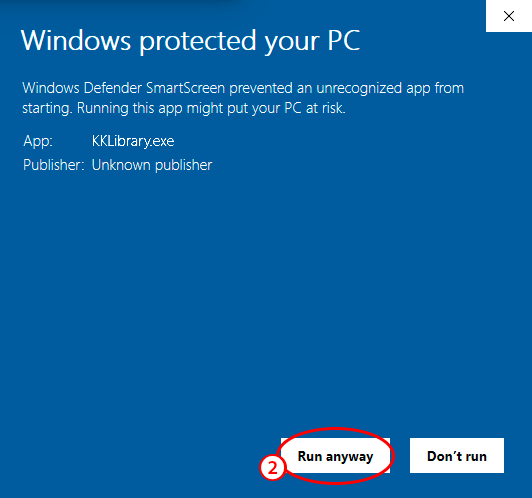
Yes, it's safe, it's just not code-signed. Choose "More info → Run anyway" to start it. If you want to check it first, compare your download with the SHA-256 on this page.

Windows SmartScreen dialog with More info highlighted
Step 1. Choose “More info”.
Windows SmartScreen dialog with Run anyway highlighted
Step 2. Choose “Run anyway”.
Will it change my game, mods or saves?

No. The only thing it can add there is a small bridge plugin in `BepInEx/plugins` and only if you connect the game for CharaStudio or Chara Maker actions.

Do I need Koikatsu installed?

No. You can scan, browse and manage scene, character card and coordinate files without the game. Koikatsu is only needed when you want to open something in CharaStudio or Chara Maker.

Can it lose or damage my files?

Scanning only reads files. It never changes them. File changes happen only when you choose an edit or organize action. Deletes go to Trash, Organize shows the plan first and editing assets keeps a backup.

Does it send my scenes, cards or tags anywhere?

No. KK Library does not upload your scenes, cards, tags or any other file. Your collection stays on your PC.

How do I get updates?

When a new version is out, the app shows a download link. Grab the new ZIP and replace the old folder. Your settings and data stay where they are. Nothing updates itself in the background.

How do I remove it?

It is portable, so there is nothing to uninstall. Delete the folder and it is gone.

Full Feature List

What is supported right now

A reference list of what KK Library can do, where to find it and when it was introduced.

Scenes, character cards and outfits each have their own mode in one library. "Early beta" means the feature shipped before this site started tracking every addition in detail.

Identify & Inspect

Feature What it does Where Available since
Scene and Character libraries Browse scenes, character and outfit cards in their own views, all from one catalog. Scene, Character and Outfit tabs beta.6, beta.8
Folder scanning Scan one or more folders into a single searchable library. Mixed folders are fine. Main window, Add Library, Manage Libraries Early beta
Scene details Read the preview, cast, map, date, animation status and other details without opening the game. Grid cards, Inspector Early beta
Character card details Read a card's name, profile, outfits, mod list and other details. Edit supported profile fields without opening Chara Maker. Grid cards, Inspector beta.6
Card textures and materials Browse, preview, export or replace textures. Edit supported material and overlay slots. Review every change before saving. KK Library backs up the card first. Character Inspector / Advanced details… beta.7
Extract characters from a scene Save characters embedded in a studio scene as regular character cards. Scene Inspector / Extract characters… beta.6
Animated and modded scene detection Find Timeline scenes, show modded or vanilla status and list required mods. Grid badges, Inspector beta.3
Animated status correction Mark a scene Animated or Not animated when automatic detection gets it wrong. Leftover Timeline data can be cleared and restored. Scene Inspector / Animated beta.7
Background indexing Start browsing quickly while indexing continues in the background. Main window during Sync Early beta
Installed / missing mod check Check a scene's required zipmods against your Koikatsu install and mark each one installed or missing. Inspector, Sync / Rescan mods beta.5
Reanalyze one scene or card Refresh a scene or card after another tool changes it, without scanning the whole library again. Inspector ⋯ / Force reanalyze beta.7
Inspector windows Open several scene or card inspectors in separate windows and keep their edits in sync. Inspector ⋯ / Open in new window beta.7

Browse & Search

Feature What it does Where Available since
Thumbnail library view Browse scenes or character cards in a fast, resizable grid built for large libraries. Main window Early beta
Unified search and filters Search by text, sort, filter and combine author, tag and "similar to" chips. Top search bar, toolbar, sidebar beta.3
Faceted navigation Browse by library, author, tag, favorites, duplicates and Trash. Left sidebar beta.3
Sort and quick filters Sort by name or date, reverse the order and show only animated scenes when needed. Toolbar Early beta
Pick several authors or tags Ctrl+click adds a name to what you are filtering by, Shift+click takes a range and the grid shows the files matching any of them. Authors and Tags sidebar beta.8

Curate

Feature What it does Where Available since
Tags, ratings and favorites Add color-coded tags, set Safe or R-18, blur previews and keep favorites for quick return. Inspector, bulk panel, Tags sidebar, Favorites scope Early beta
Edits keep your library work Tags, ratings, favorites and authors stay attached even when a scene or card is edited outside the app. Across the library beta.6
Author Management Assign, confirm, rename, merge or remove authors, with "? Unknown" supported explicitly. beta.8 expands this into a dedicated window with overview, profiles and a one-group-at-a-time review flow for unknown authors. Inspector, Authors sidebar, Tools / Author Management… Early beta / beta.8
Author profiles Each author gets a real profile with names, aliases and links. KK Library uses official sites for the avatar and banner and keeps a verified-authors list beside the app. Author Management, Settings beta.8
Tag management Rename or delete tags everywhere. A multi-selection shows the tags shared by every selected item. beta.8 adds a full Tag Manager for tags and categories, including merge, move, recolor and bilingual names. Inspector tag menu, bulk panel, Tags sidebar, Tools / Tag Management… beta.7 / beta.8

Duplicates & Similar

Feature What it does Where Available since
Exact duplicate review Group byte-identical files and let you choose which copy to keep. Tools / Review duplicates Early beta
Folder-based duplicate filters Narrow duplicate and similar-scene results with path rules and wildcard matching. Review duplicates, Find similar beta.4
Similar-scene review Find scenes that look or behave like variations of each other, not just exact copies. Tools / Find similar, Inspector / Find similar Early beta
Character card duplicates Find exact copies, the same character saved in different cards and close variants that reuse the same face or body. Tools / Review duplicates, Find similar beta.7
Outfit variations Find the same outfit with a piece swapped, a shorter version or a patterned cut. Every row says how the two are related and what each one carries. Tools / Find similar, Tools / Review duplicates beta.8

Organize & Protect

Feature What it does Where Available since
Trash bin Move scenes or cards to Trash first, then restore or empty it later. Inspector, Trash scope Early beta
Organize Files Build a folder layout for scenes, cards or outfits, preview the result and then move the files or copy them as a backup. The last move can be undone. Tools / Organize Files Early beta

Integration & Setup

Feature What it does Where Available since
Open in CharaStudio Send a selected scene straight into CharaStudio, with an option to import it into the scene already open there. Inspector, scene tile menu Early beta
Quick List Add scenes, cards and outfits with the "+" side of the CharaStudio button. The window can stay above the game while you drag them into CharaStudio or Chara Maker. Clearing the current tab leaves the other tab untouched. Quick List, Inspector, tile menu beta.7
Add or replace a character in CharaStudio Send a character card into Studio, either as a new character or as a replacement for the one you selected. Inspector, card tile menu beta.6
Edit a card in Koikatsu Open a character card in the game's character editor, then come back with your changes still attached. Inspector, card tile menu beta.6
Live CharaStudio load status Show real progress while Studio starts and loads a scene, including queued loads and failures. Status bar, Inspector beta.5
KK and KKS bridge support Works with both Koikatsu and Koikatsu Sunshine when you point KK Library at the right game folder. Settings, first-run setup beta.6
Bridge setup and updates Configure the game folder once and KK Library keeps the bundled bridge installed and up to date for you. Settings, first-run setup beta.3
First-run setup Help new users connect Koikatsu and add their first library folder. First launch, Settings beta.3

Support keeps
the project going!

If you liked the app, your support is appreciated.